Every feature, explained.

SchemeSync CRE is built around a simple idea: every commercial client is different, so every property should be evaluated against their actual requirements — not assumptions about what matters in a market. Here's how that plays out across the product.

A client experience that respects their requirements.

My Requirements

Set priorities once. Change them anytime.

Clients define their own weighted priorities via sliders across the five commercial categories: Location & Access, Financials, Building Specs, Condition & Systems, Zoning & Use. Sub-criteria roll up into parent categories — parents must sum to 100%, sub-criteria are weighted relative within their parent. Every adjustment auto-saves and triggers a rescore.

Client Dashboard

Top five matches. Ranked, scored, explained.

The first thing a client sees when they log in: their top five highest-scoring properties with fit percentages, tier badges, and a one-tap path into full details. Built to answer "which space should we tour next?" without the back-and-forth.

Match Board

Every property, ranked for them.

The client's version of the agent view. All available properties ordered by fit score with tier badges. Lease vs purchase view toggle. Budget color coding for rent or acquisition — green for in-range, yellow for stretch, red for over. One click to the full evaluation.

Grading & Overrides

After the tour, their perspective matters.

Auto-scoring handles the baseline. But a client walks through a space and sees things the listing didn't capture — the loading dock is narrower than spec, the HVAC is older than disclosed, the column spacing is wrong for the build-out. Any criterion can be overridden with a slider. Overrides turn green so it's clear which scores came from the client. Reset to auto-grade with one click.

Notes

What worked. What worried them. In their own words.

Clients write free-form notes on any property. "The 16-foot clear height works but the bay door is too narrow for our forklift." "Building looks great but the parking ratio won't support a 9-to-5 office." Those notes feed into the AI report so it speaks to what the client actually experienced, not just the data on the listing.

AI Report

A detailed analysis, tailored to them.

One-click report generation per property. The AI references the lease terms, NOI, cap rate, TI allowance, building systems, and zoning — alongside the client's criteria, grade overrides, notes, and comparisons to other properties on their match board. Styled display, print-ready formatting. Professional enough to bring to a board or investment committee.
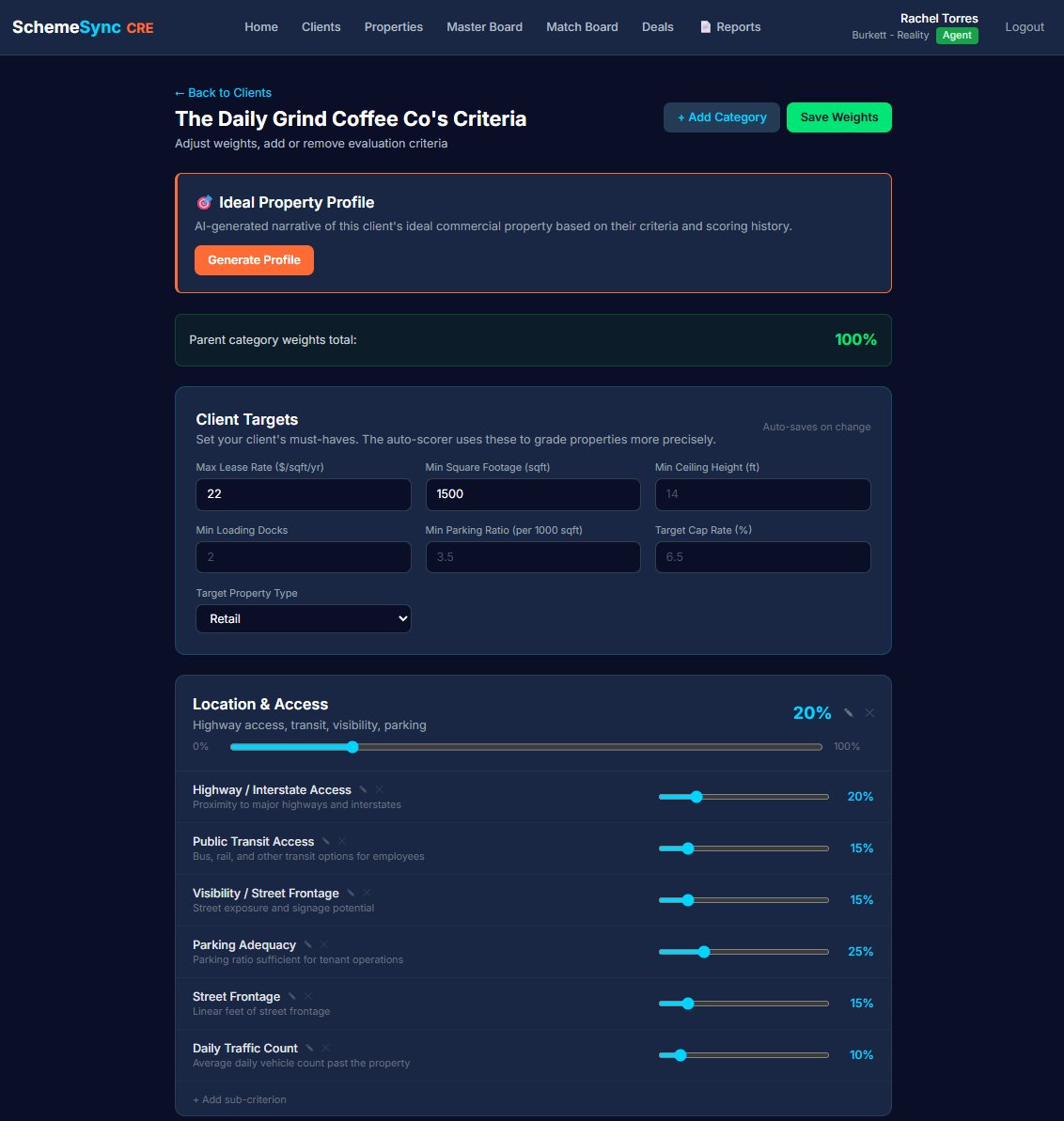
Client criteria screen in SchemeSync CRE showing an Ideal Property Profile panel, Client Targets fields for max lease rate, minimum square footage and ceiling height, and weighted sliders for Location & Access sub-criteria including highway access, public transit, visibility, parking adequacy and daily traffic count.
My Requirements

Each client sets category weights and sub-criteria sliders, with parent categories totalling 100%. Client Targets carry the hard numbers underneath.
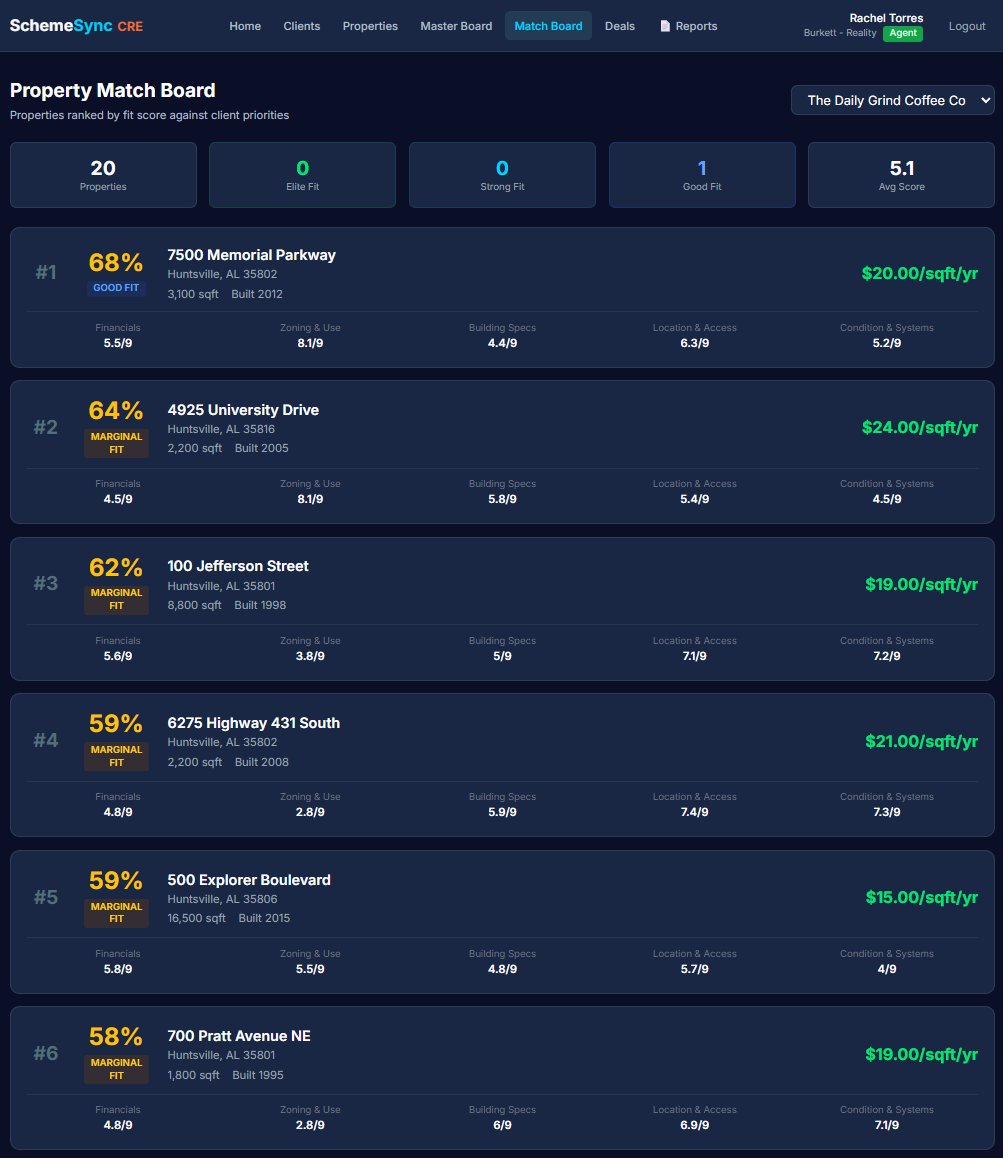
SchemeSync CRE property match board listing 20 properties ranked by fit score for The Daily Grind Coffee Co, with tier badges, per-property lease rates and category sub-scores for each ranked result.
Match Board

Every property ranked by weighted fit score for the client in front of you, with tier badges and lease rate at a glance.
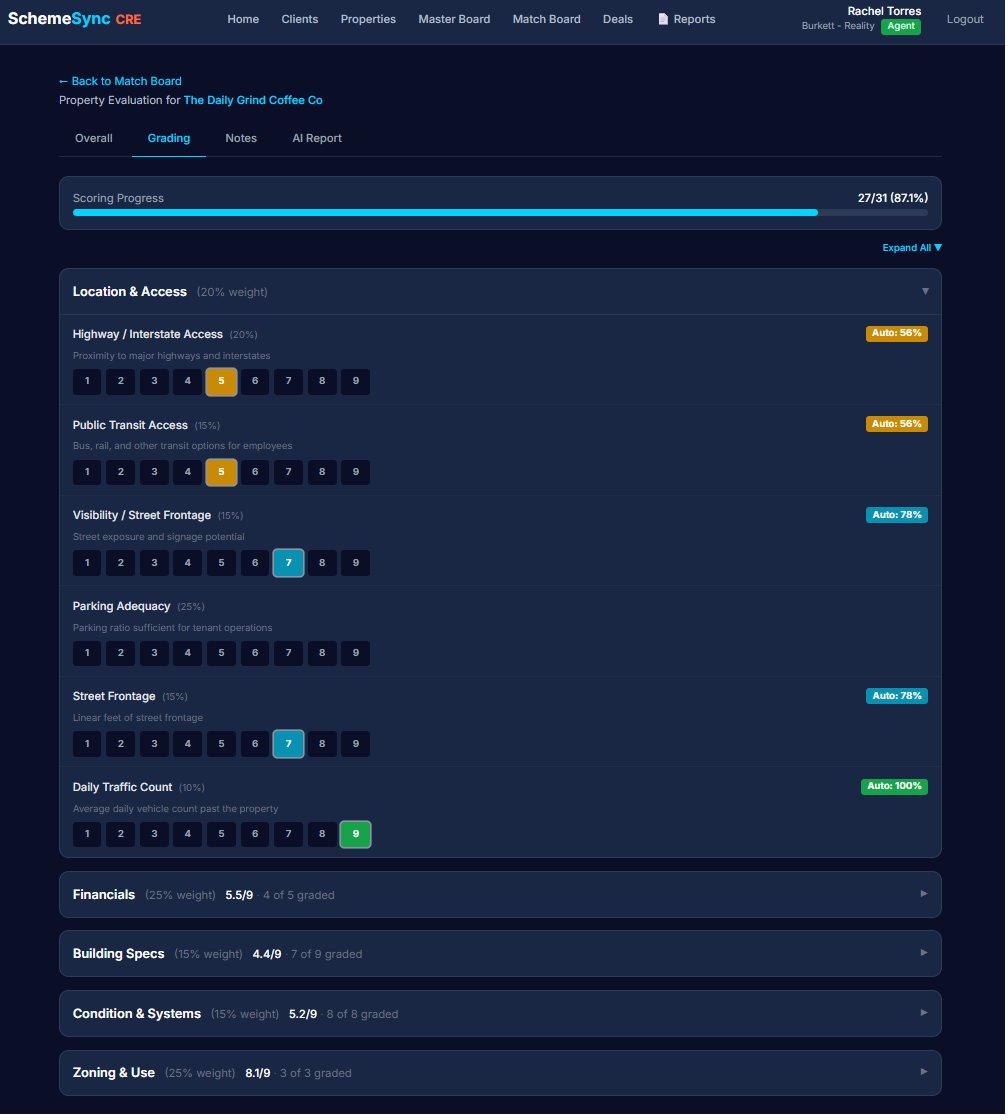
Grading tab of a SchemeSync CRE property evaluation showing scoring progress, a Location & Access category expanded with 1-to-9 grade selectors per criterion, and collapsed Financials, Building Specs, Condition & Systems and Zoning & Use categories.
Grading & Overrides

After the tour, any criterion can be regraded on a 1-9 scale. Scoring progress shows how much of the evaluation is complete.
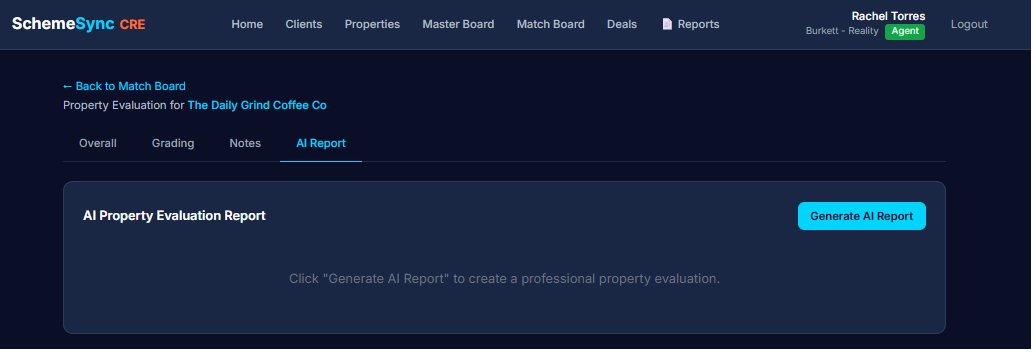
AI Property Evaluation Report panel in SchemeSync CRE with a Generate AI Report button, ready to produce a client-facing written evaluation for the selected property.
AI Report

One click generates a client-facing written evaluation grounded in the listing data, the client’s criteria, and their notes.
Tools for agents who want to close smarter.

Client Management

Your book of business, structured.

Create clients with full pipeline fields: stage (Hot Lead, Warm Lead, Active, Early Stage, Cold), transaction type (lease, purchase, or both), timeline, decision-maker. Give them login access or keep the account under your control. Search, filter, and sort across everyone in your book.

Property Management

Roughly 55 commercial fields, organized for fast entry.

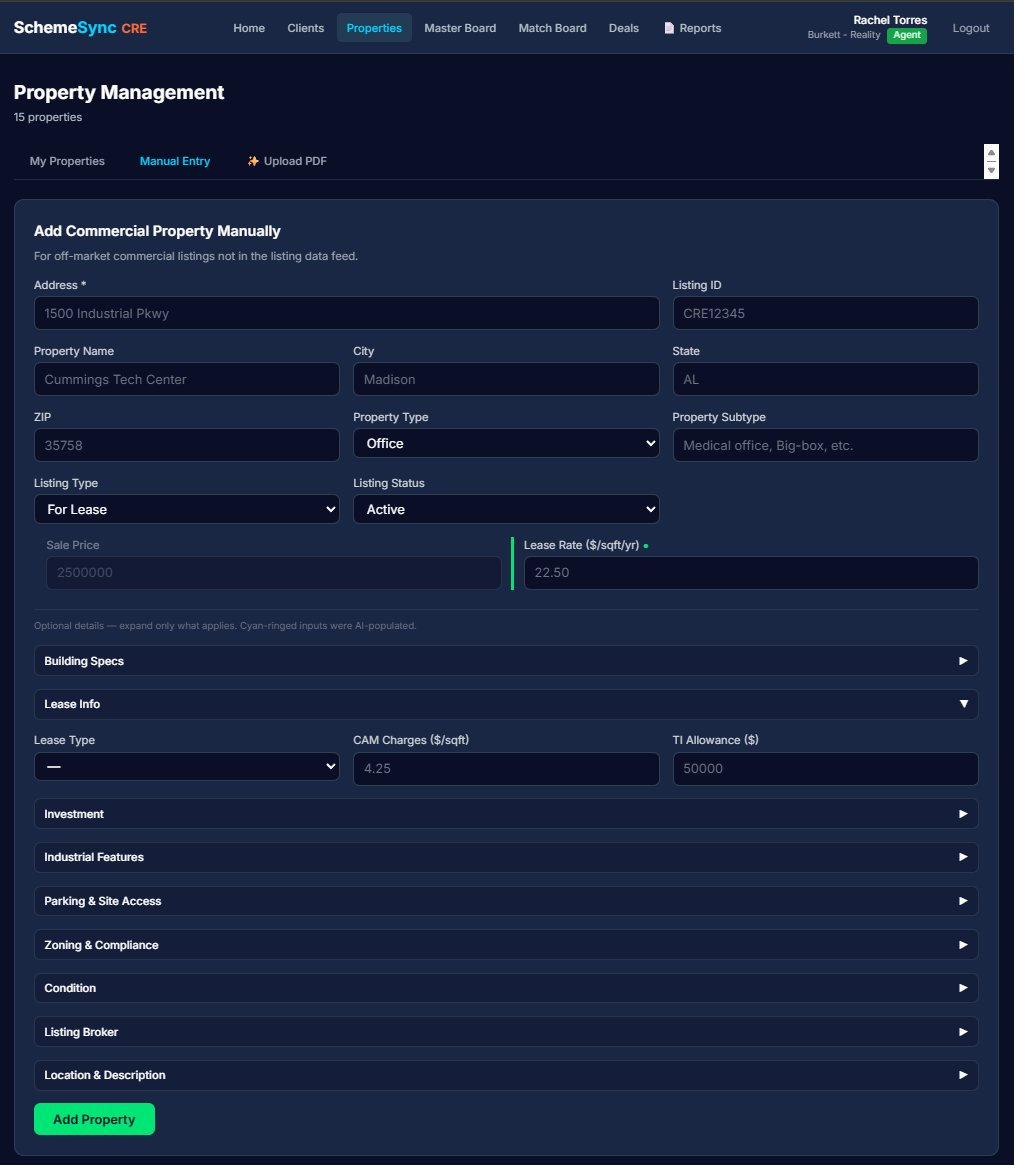
Commercial property data doesn't fit a residential schema. SchemeSync CRE captures roughly 55 fields organized in collapsible sections — Building Specs, Lease Info, Investment, Parking, Zoning, Condition. Photos and documents attach per property. One save scores against every active client in your book. And when the data already exists in a brochure or offering memorandum, PDF extraction fills the form for you.

Master Board

Which client for which property, right now.

The agent's ranking view. Properties ordered by weighted client readiness across pipeline stage, budget alignment, transaction urgency, and fit score. Move the sliders to reprioritize. Demand bars show client interest. Tier badges color-code status at a glance.

Match Board (Client View)

See what your client sees.

Select any client from a dropdown and see their full ranked match board exactly as they see it. Useful for prep before a tour or call: "Here's where your top three are this week, and here's why the fourth dropped after our last conversation."

Grade on Behalf of Clients

For specs the client never tours personally.

Commercial deals often involve specifications the client trusts the agent to evaluate — roof age, sprinkler density, electrical service, mezzanine code compliance. Agents can grade on behalf of clients with a clear marker showing the source, so the client knows what came from them and what came from the broker's expertise.

Evaluation Detail

The full picture per property per client.

Each property generates an evaluation record per client — category scores, strengths and concerns, the full AI report, the client's notes (read-only for agents). Everything you need to walk into a meeting prepared.

Daily Brew

The morning action plan, waiting when you log in.

An AI-generated plan for the day built from your own pipeline and book of business. What moved yesterday, what's gone quiet, which clients are closest to a decision, and where the next hour is best spent. Brokers get their own version across the team. It's the difference between opening the app and wondering where to start, and opening the app already knowing.

SchemeSync AI Chat

Ask your portfolio a question.

A chat interface answering from your own book — properties, clients, deals, and evaluations. Ask which clients are stretching their budget on every match, which deals have gone three weeks without movement, or which properties nobody has scored yet. Plain language in, an answer grounded in your data out. No report to run, no filter to build.

PDF Extraction

The offering memorandum does the data entry.

Upload a brochure or an offering memorandum and roughly 55 property fields pre-fill for review. Square footage, lease rate, cap rate, NOI, year built, parking counts, zoning — pulled from the document and staged in the form. You verify what the AI read, correct anything the document got wrong, and save. Adding a property becomes a review step instead of a data-entry session.

Ideal Property Profile & Client Targets

The requirement in words, and in numbers.

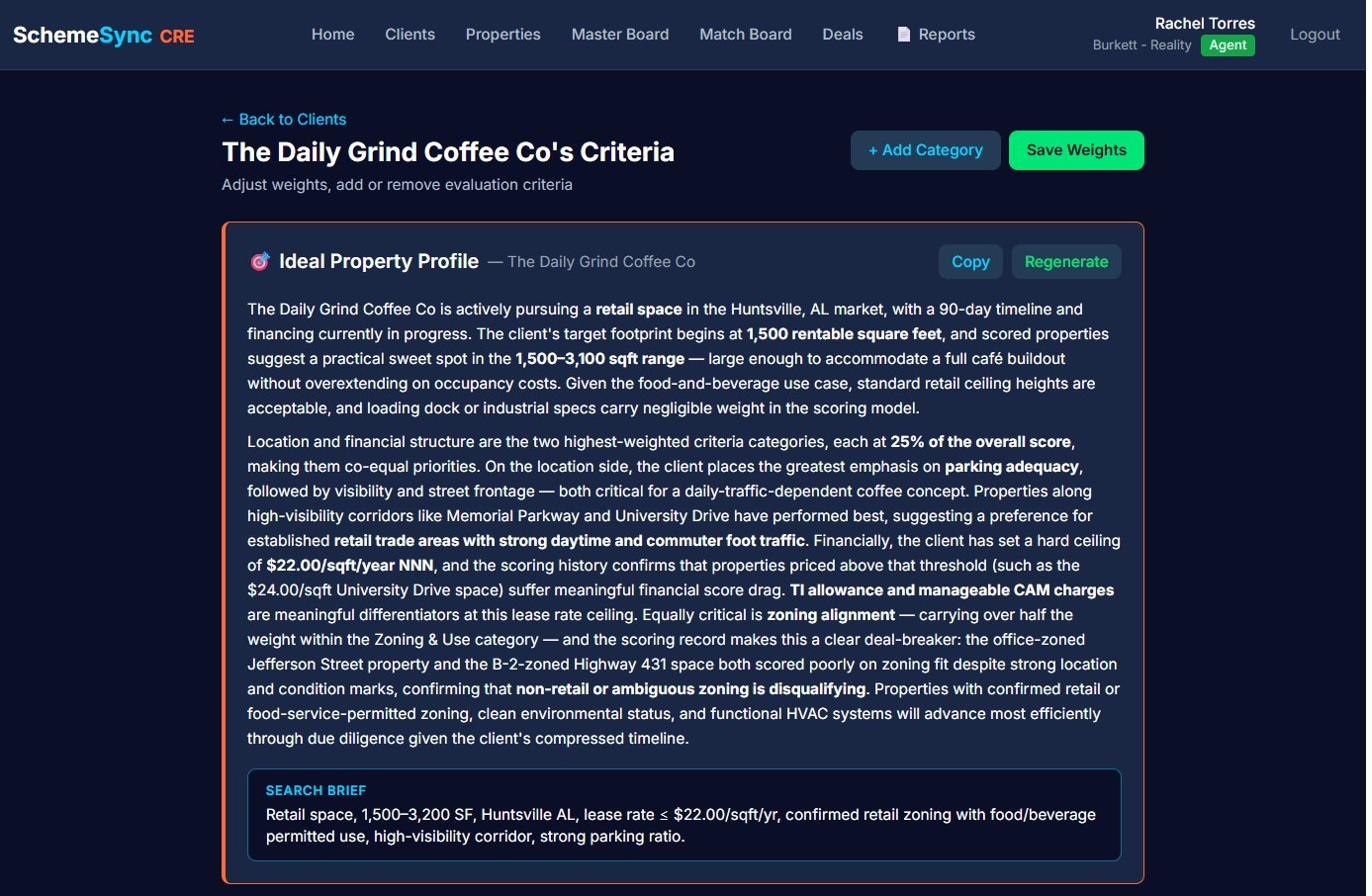
The Ideal Property Profile is an AI-written narrative of what a client is actually after — the description you'd give a colleague if they asked what you were hunting for. Client Targets are the hard numbers underneath: the specific figures every property gets scored against with real precision. The narrative makes it legible; the targets make it exact.

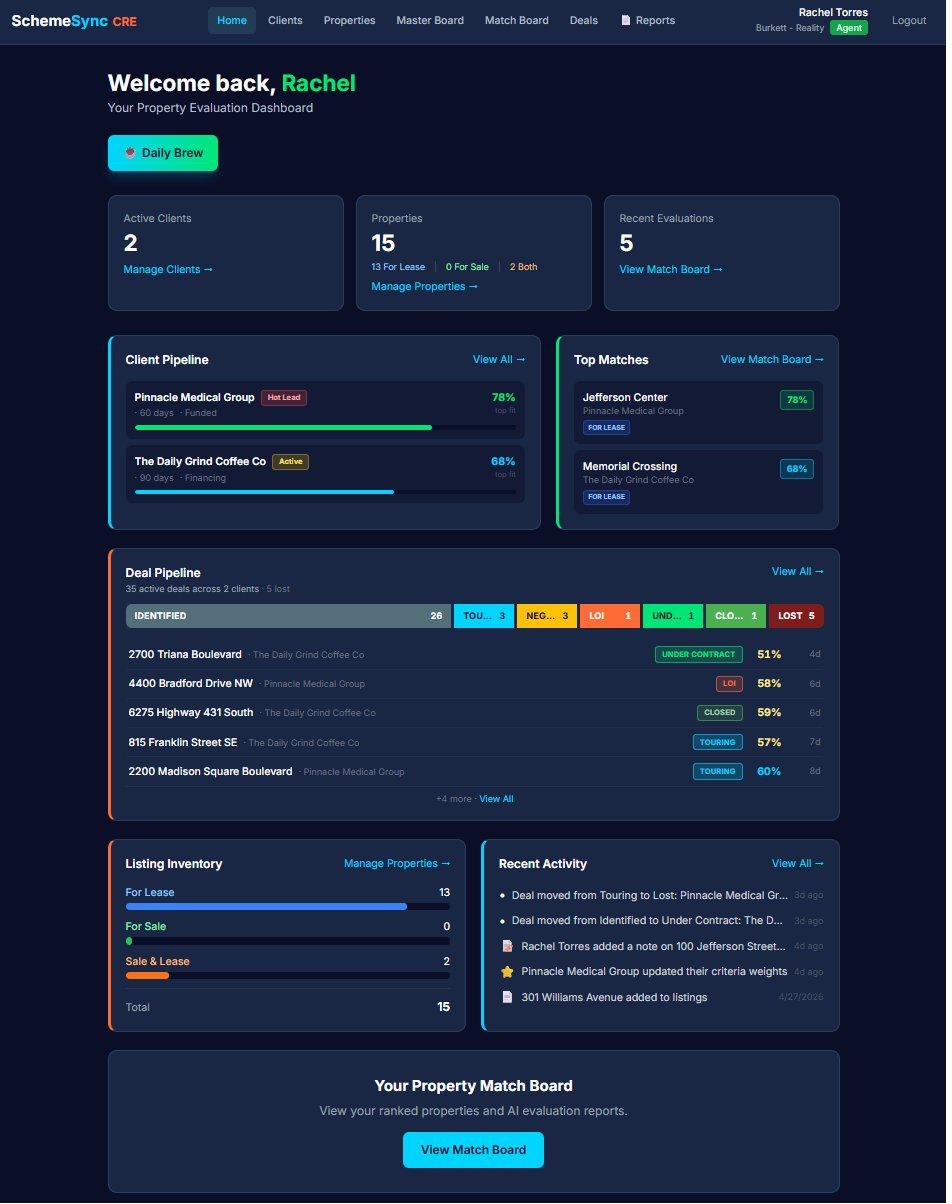
SchemeSync CRE agent dashboard showing active client and property counts, a client pipeline with fit percentages, top matches, the deal pipeline by stage, listing inventory split by lease and sale, and a recent activity feed.
Agent Dashboard

The agent’s home screen: pipeline, top matches, listing inventory and recent activity in one view.

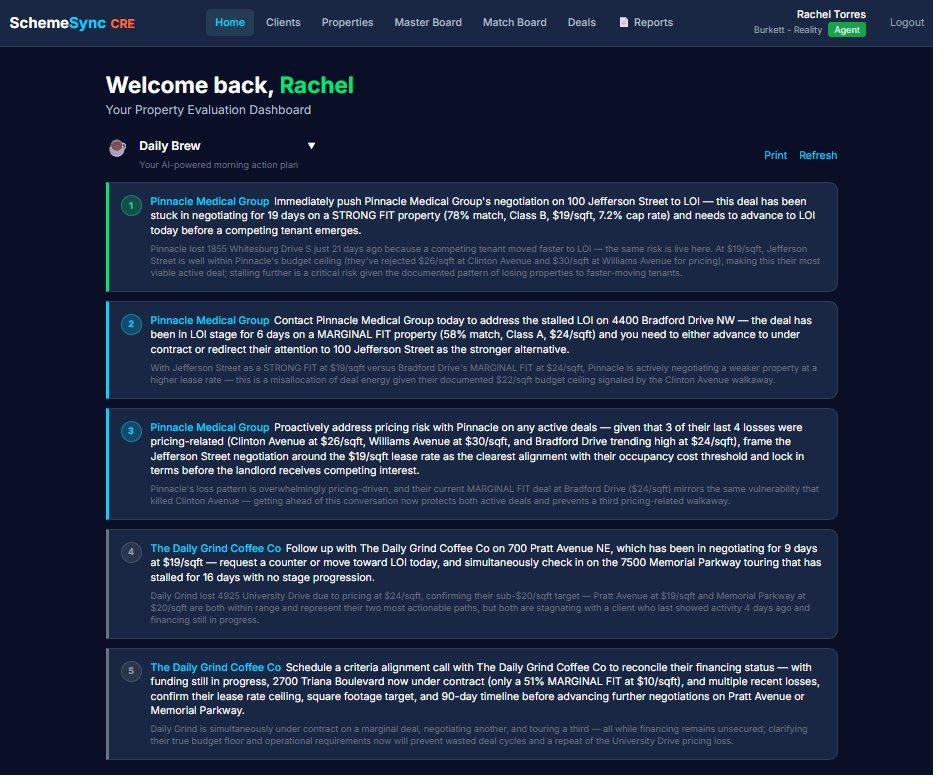
Daily Brew panel in SchemeSync CRE listing numbered AI-generated action items for the day, each naming a specific client and deal with recommended next steps and supporting figures.
Daily Brew

The AI morning action plan, built from your own pipeline. Numbered, specific, and tied to named deals.

Property Management screen in SchemeSync CRE with My Properties, Manual Entry and Upload PDF tabs, showing the commercial property form with address, listing, lease and pricing fields plus collapsible sections for building specs, investment, parking, zoning and condition.
PDF Extraction

Upload a brochure or offering memorandum on the Upload PDF tab and roughly 55 fields pre-fill for review across these collapsible sections.

Ideal Property Profile in SchemeSync CRE showing an AI-written narrative describing a client’s requirement in prose, with a highlighted search brief summarising target size, lease rate and zoning at the foot of the panel.
Ideal Property Profile

The AI-written narrative of what the client actually needs, ending in a concise search brief.

Seven stages, from Identified to Closed.

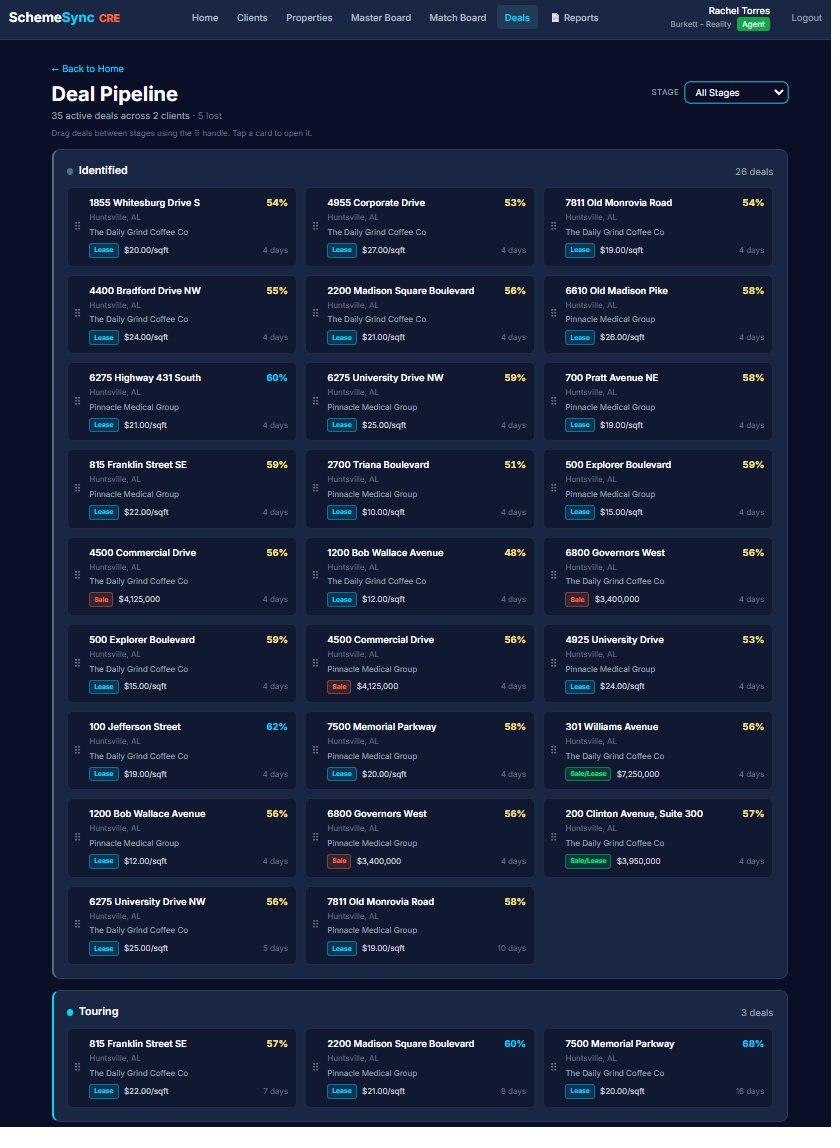
Matching a client to a space is the beginning of the work, not the end of it. Every deal in SchemeSync CRE moves through a seven-stage pipeline — Identified, Touring, Negotiating, LOI, Under Contract, Closed, and Lost — so at any moment you can see exactly where every deal in the book actually stands.

The Seven Stages

The shape of a commercial deal, start to finish.

The stages follow how commercial transactions actually progress — including the two endings, because a deal that dies is still a deal that has to be recorded.

  • Identified — the client and the space are matched
  • Touring — the space is being walked and graded
  • Negotiating — terms are in play
  • LOI — letter of intent on the table
  • Under Contract — signed and working toward close
  • Closed — the deal is done
  • Lost — the deal ended, and the reason is captured
Drag and Drop

Move a deal by moving it.

Drag a deal from one stage to the next. No status dropdown buried three clicks into an edit form, no separate update step that everyone forgets to do. The board reflects reality because keeping it accurate takes a second.

Loss Capture

When you lose one, the reason gets written down.

Marking a deal lost prompts for the reason. Price, timing, a competing space, a client who never had budget in the first place. It takes a moment, and it turns the most expensive thing that happens in a brokerage into something the firm can actually learn from.

Institutional Memory

The losses stay with the brokerage.

Lost-deal history doesn't leave when an agent does, and it doesn't fade the way memory does. Two years of captured reasons become a record of how your firm actually loses business — which is the only honest starting point for losing less of it.

Pipeline Visibility

Every deal, every stage, at a glance.

Agents see their own pipeline. Brokers see it rolled up across the team. The stage-by-stage view answers the two questions that matter on a Monday: what's close, and what's stuck.

SchemeSync CRE deal pipeline board with deals arranged in stage columns beginning at Identified and Touring, each card showing the property address, client, fit percentage and days in stage.
The Deal Pipeline

Every deal on the board, by stage, with fit percentage and days in stage on each card. Drag to move one forward.

Seven reports, built from your own deal data.

Reporting in most brokerage software means an export. Here it means analysis — AI reading the deals, clients, and properties you already have in the system and telling you something you didn't already know. Two of the seven change how a deal gets worked.

The Full Suite

All seven, by name.

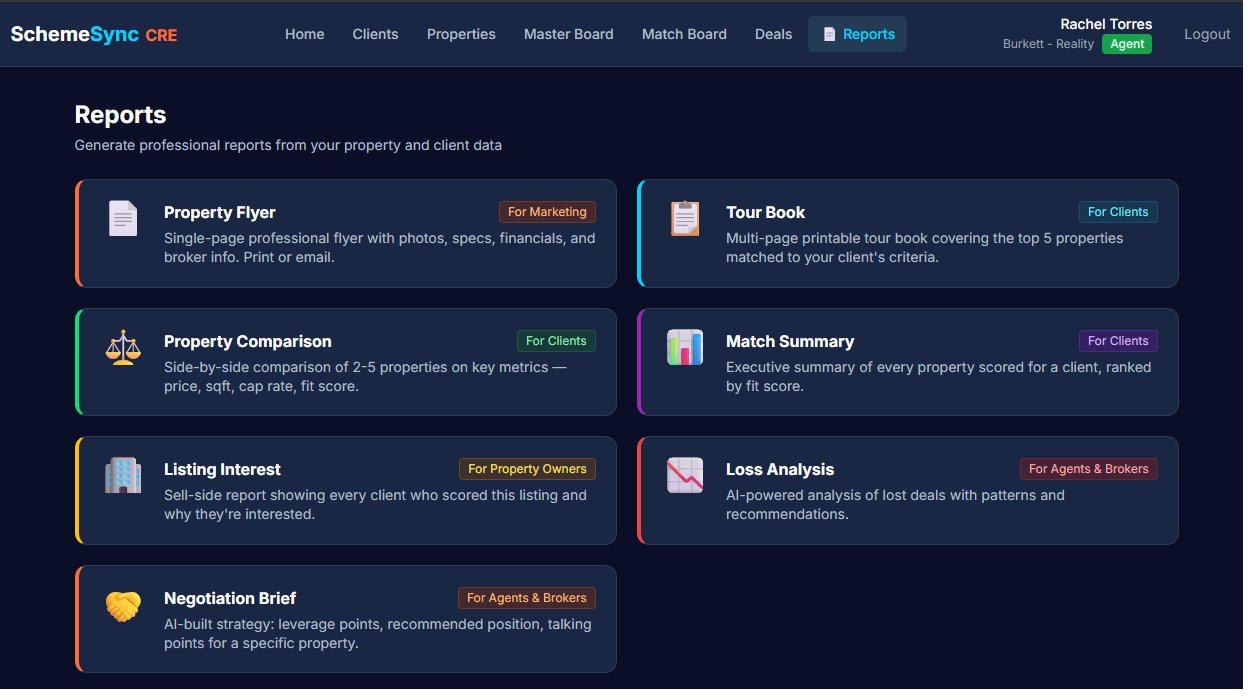
Client-facing collateral, internal analysis, and deal strategy — all generated from the properties, clients, and deals already in your system.

  • Property Flyer
  • Tour Book
  • Property Comparison
  • Match Summary
  • Listing Interest
  • Loss Analysis
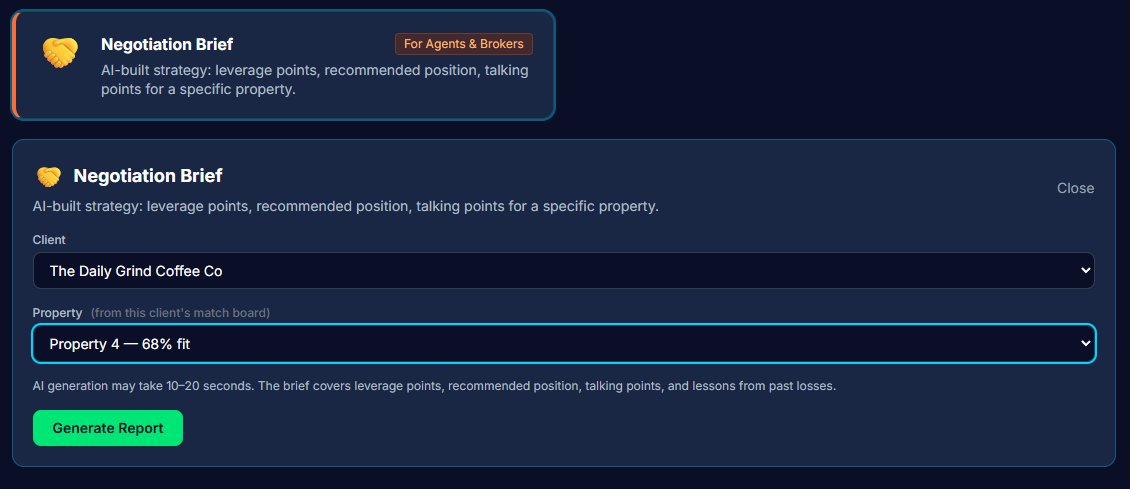
  • Negotiation Brief
Negotiation Brief

AI deal strategy, before you walk in.

Generated for a specific deal. The Negotiation Brief lays out where your leverage actually is, what to target and where to walk away, and the talking points to bring into the conversation. It's the prep a senior broker would do on the back of an envelope on the drive over — except it's done, it's written down, and it's grounded in the deal's real numbers.

  • Leverage points specific to the deal
  • Target number and walk-away number
  • Talking points for the negotiation
  • Built from the deal's own data, not a template
Loss Analysis

Every deal you lost, read for the pattern.

Loss Analysis takes the reasons captured on every lost deal and finds what they have in common — the property types that keep falling through, the stage where deals die, the client profile that never closes. Then it does the useful part: it flags the deals in your active pipeline that are starting to look like the ones you already lost, while there's still time to do something about it.

  • AI pattern analysis across all lost deals
  • Surfaces the common threads behind losses
  • Flags active deals resembling past losses
  • Turns loss capture into an early warning system
Reports screen in SchemeSync CRE showing all seven reports as cards: Property Flyer and Tour Book, Property Comparison, Match Summary, Listing Interest, Loss Analysis and Negotiation Brief, each tagged for marketing, clients, or agents and brokers.
The Full Suite

All seven reports, each tagged by who it is for — marketing, clients, or agents and brokers.

Negotiation Brief generator in SchemeSync CRE, tagged for agents and brokers, with client and property selectors and a note that the brief covers leverage points, recommended position, talking points and lessons from past losses.
Negotiation Brief

Pick the client and the deal, generate the brief. Leverage points, recommended position, talking points.

Brokerage-level scope, built in.

Brokerage Scoping

One firm, one data boundary.

Every agent, client, property, and evaluation belongs to a brokerage. Data never leaks across firms. When you add an agent, their existing clients and properties roll up to your visibility. When an agent leaves, the data stays with the brokerage.

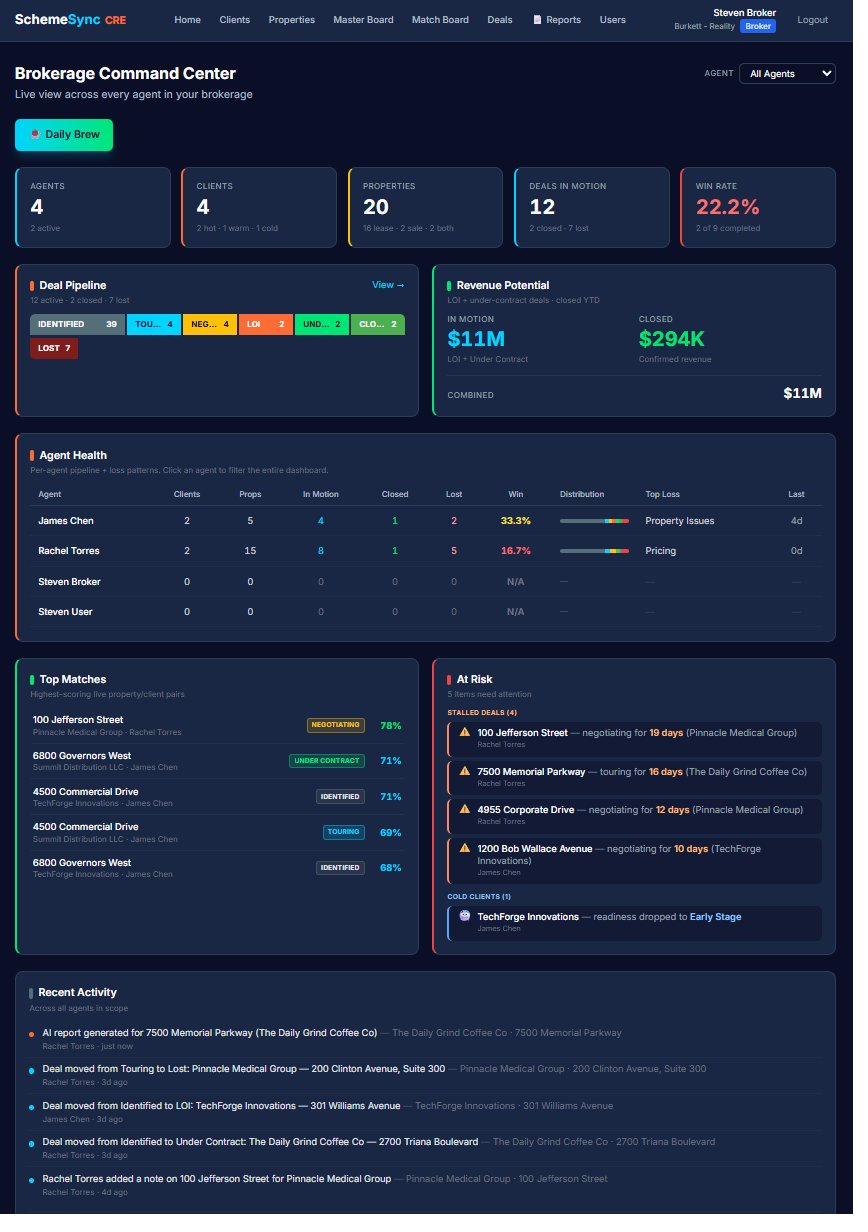
Broker Dashboard

Aggregate view across every agent.

Pipeline activity rolled up across all agents, with stage-by-stage visualization and AI-generated action plans for where to focus the team this week. See which properties your firm is touching, which clients are closest to close, and where the bottlenecks are.

User Management

Add agents. Reset passwords. Deactivate when needed.

Brokers manage user accounts within their firm. Create agent accounts, reset passwords, deactivate departed agents. Standard brokerage administration, without the phone call to IT.

Brokerage Admin Role

A fourth role for the people who run the office.

Brokerage Admin is a full role alongside Broker, Agent, and Client — for the office manager or operations lead who handles user accounts and office setup but doesn't carry a book of business. Full administrative access to the firm's setup, without the agent-side deal tooling they'd never open.

Brokerage Command Center in SchemeSync CRE showing firm-wide counts of agents, clients, properties and deals in motion alongside win rate, deal pipeline and revenue potential, an agent health table, top matches, at-risk deals and a recent activity feed.
Brokerage Command Center

The brokerage view: activity rolled up across every agent, with agent health, at-risk deals and firm-wide pipeline.

Run as the association's own platform.

SchemeSync CRE is deployed as an association's own branded platform. Member brokerages onboard underneath it with board approval, the agents inside those firms get the working product, and every client gets their own login.

The Association's Platform

Your association's name on it.

The deployment belongs to the association and carries its branding throughout, so member firms experience it as a service the association provides rather than a third-party tool they were pointed at.

Members Onboard Underneath

Brokerages join the platform. The board approves them.

Member firms register themselves and land in an approval queue. The board decides who gets in. No provisioning tickets, no manual account creation, and no member firm waiting three days to start because someone was out of the office. Firms sit underneath the association's platform — they don't run one of their own.

Central User Management

See and manage accounts across the membership.

User accounts are administered at the association level, so the association can see what's set up across the whole membership rather than chasing each member firm separately. Adding a member brokerage, adding its agents, and keeping the roster current all happen in one place. Within each firm, Brokerage Admins handle that firm's own accounts and office setup.

Agents Get the Tools

The working product, inside every member firm.

Agents at an approved member brokerage get the full product — match boards, the seven-stage deal pipeline, the seven-report suite, SchemeSync AI chat, and the Daily Brew. The association provides the platform; the agents do the work on it.

Client Access

Every client gets their own login.

Clients get their own login to see their match board, adjust their requirements, override grades after a tour, and read the AI reports written for them. The agent keeps the relationship; the client gets a tool that respects their intelligence.

One Login, Both Products

SchemeSync RE and CRE share an account.

Agents who work both residential and commercial use a single login across SchemeSync RE and SchemeSync CRE. One account, one onboarding, no separate credentials to manage. See SchemeSync RE →

That’s the product, end to end.

Weighted fit scoring across five commercial categories, a seven-stage deal pipeline, AI negotiation strategy, and loss analysis that flags the deals starting to look like past losses.

steven@aida-advisory.com · (256) 631-9018