Show your clients the right space.

AI-powered property evaluation that ranks every commercial listing by how well it fits each client's actual requirements — then carries the deal from Identified to Closed. Weighted scoring, a seven-stage pipeline, AI strategy reports, and a morning action plan built from your own book.
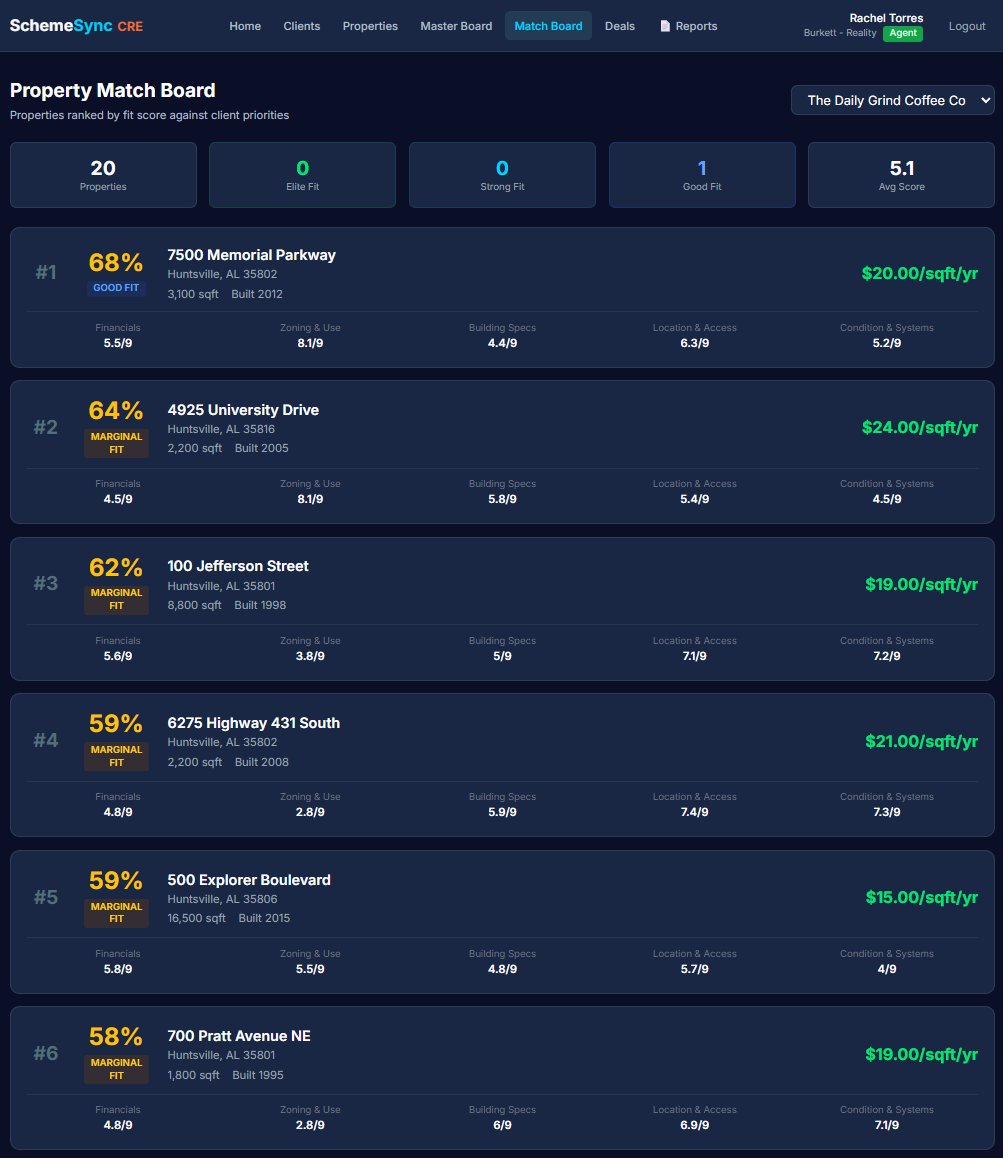
SchemeSync CRE property match board ranking 20 commercial properties by fit score for a single client, each row showing a tier badge, fit percentage, lease rate and category sub-scores.

Twenty listings in a spreadsheet doesn't close a deal.

Commercial tenants and investors waste days touring spaces that don't meet their specs. Agents spend hours building comparison spreadsheets that go stale the next morning. Cap rates, lease terms, zoning, ceiling heights, parking ratios, TI allowances — the variables are complex and every client weights them differently. A LoopNet feed and a Google Sheet don't know any of that. So the wrong tours get scheduled, the right deals get missed, and brokers carry the cost.

Structured client requirements. Ranked matches. Real AI analysis.

SchemeSync CRE turns each client's requirements into a weighted scoring model across five commercial categories: Location & Access, Financials, Building Specs, Condition & Systems, and Zoning & Use. Every property gets a fit score, a tier classification, and an AI-generated report written specifically for that client.

Weighted Fit Scoring

The math behind "is this the right space?"

Each client sets their own priority weights across the five commercial categories. Lease rate against budget, cap rate, building class, zoning compatibility, ceiling height, loading docks, parking ratio — every property gets scored against their model.

  • Client-defined category weights via sliders
  • Sub-criteria weighted relative to their parent
  • 1-9 grade per criterion, weighted average for fit score
  • Tier classification: Elite, Strong, Good, Marginal, Poor
AI Property Reports

A detailed write-up for every listing, in one click.

Every property generates a custom client-facing AI report that references the actual lease terms, NOI, cap rate, TI allowance, and building systems alongside the client's criteria, grade overrides, and tour notes. Not template copy. Real analysis.

  • One-click generation per property per client
  • References lease terms, NOI, cap rate, TI allowance
  • Incorporates client notes and grade overrides
  • Professional print formatting, ready to share
Match Board

Every client's ranked list, in one place.

Instead of emailing PDFs back and forth, open the match board. See every property ranked by fit score for the client in front of you. Works for both lease and purchase transactions, with a view toggle for each.

  • Properties ranked by weighted fit score
  • Tier badges: Elite, Strong, Good, Marginal, Poor
  • Lease vs purchase view toggle per client
  • Click-through to full evaluation and AI report
Property Management

Manual entry built for commercial complexity.

Commercial property data doesn't fit a residential schema. SchemeSync CRE captures roughly 55 commercial fields organized in collapsible sections so adding a property is fast even when the dataset is deep — or upload a brochure and let the AI fill them in.

  • Roughly 55 commercial property fields
  • PDF extraction pre-fills the form from a brochure or OM
  • Collapsible sections: Building Specs, Lease Info, Investment, Parking, Zoning, Condition
  • One save scores against every active client
  • Photo and document attachments per property
Grade Overrides

After the tour, the score updates.

Auto-scoring is the starting point. After a client tours a space, agent or client can override any grade — the loading dock turned out smaller than the listing said, the HVAC condition is worse than disclosed. In commercial, agents can grade on behalf of clients.

  • Per-criterion override sliders, per client per property
  • Agents can grade on behalf of clients
  • Color-coded to show divergence from auto-grade
  • Reset button to revert to auto-grade any time
Master Board (Agent View)

See which clients are ready to transact — today.

The agent-side ranking view. Properties ordered by weighted client readiness across the agent's portfolio. Move the sliders to see who to call first. Know instantly which client is most likely to close on which space.

  • Weighted client readiness across urgency factors
  • Adjustable sliders to reprioritize on the fly
  • Demand bars showing client interest per property
  • Color-coded status badges for fast scanning
Client Readiness Score

Hot Lead, Warm Lead, Active, Early Stage, Cold.

A five-stage pipeline classification for every client in your book. Hot Leads surface automatically so you know where to spend the next hour. Cold clients drop out of the daily view without falling out of the system.

  • Five-stage pipeline classification
  • Hot Leads surface automatically on the dashboard
  • Re-ranks clients across the agent's book
  • Feeds the Master Board readiness weighting
Broker Dashboard

Aggregate view across every agent.

The brokerage-level view. Pipeline activity rolled up across all agents, with stage-by-stage visualization and AI-generated action plans for where to focus the team this week.

  • Aggregate view across all agents
  • Pipeline visualization by stage
  • AI-generated action plans per agent
  • Brokerage-level performance metrics

Matching is where it starts. Closing is the job.

A fit score tells you which space to show. It doesn't tell you what to do Monday morning, where the deal stalled, or what your leverage is when the counter comes back. SchemeSync CRE runs the whole deal — pipeline, strategy, and the daily work in between.

The Deal Pipeline

Seven stages, from Identified to Closed.

Every deal lives on a seven-stage pipeline: Identified, Touring, Negotiating, LOI, Under Contract, Closed, and Lost. Drag a deal to move it between stages. When one goes to Lost, the reason gets captured instead of disappearing into somebody's memory — and that record becomes institutional knowledge the whole brokerage can learn from.

  • Identified, Touring, Negotiating, LOI, Under Contract, Closed, Lost
  • Drag-and-drop between stages
  • Loss capture with structured reasons
  • Lost deals stay with the brokerage as institutional memory
Daily Brew

Your morning action plan, written before you get in.

An AI-generated plan for the day, built for agents and brokers from their own pipeline and book of business. What moved, what's at risk, and who to call first. Open it with coffee and the first hour of the day is already decided.

  • AI-generated action plan, refreshed daily
  • Built for both agents and brokers
  • Grounded in your own deals, clients, and properties
  • Surfaces what needs attention before it goes cold
The Reports Suite

Seven reports, generated from your own deal data.

Two of them change how a deal gets worked. The Negotiation Brief is AI-built strategy for a specific deal: leverage points, a target and a walk-away number, and the talking points to carry into the room. Loss Analysis reads every deal you've lost, finds the pattern, and flags the active deals that are starting to look like past losses.

  • Property Flyer
  • Tour Book
  • Property Comparison
  • Match Summary
  • Listing Interest
  • Loss Analysis
  • Negotiation Brief
SchemeSync AI

Ask your portfolio a question. Get a real answer.

A chat interface that answers from the agent's own book — properties, clients, deals, and evaluations. Ask which clients are stretching their budget on every match, or which deals haven't moved in three weeks. The answers come from your data, not from the internet.

  • Portfolio questions answered in plain language
  • Grounded in the agent's own book of business
  • No hunting through screens for the number
PDF Extraction

Upload the offering memorandum. The form fills itself.

Drop in a brochure or an offering memorandum and roughly 55 property fields pre-fill for review. You check the numbers instead of typing them, correct anything the document got wrong, and save. Deep commercial data entry stops being the reason a property sits in your inbox for a week.

  • Upload a brochure or offering memorandum
  • Roughly 55 fields pre-filled automatically
  • Everything staged for your review before saving
Ideal Property Profile & Client Targets

The requirement in words, and in numbers.

Two halves of the same picture. The Ideal Property Profile is an AI-written narrative of what the client is actually looking for — the kind of description a good agent would give a colleague over the phone. Client Targets are the hard numbers behind it, scored with precision against every property in the system.

  • AI narrative of the client's real requirement
  • Hard-number targets for precision scoring
  • Narrative and numbers stay in sync

Features that respect how commercial real estate actually works.

Four-Role Architecture

Broker, Agent, Brokerage Admin, Client. Each sees what they should.

Brokers oversee their team and aggregate pipeline. Agents manage their clients, properties, and deals. Brokerage Admins handle the administrative side of the firm — user accounts and office setup — without carrying a book of business. Clients see only their own data: requirements, match board, AI reports. Role-based permissions prevent cross-contamination and keep every conversation clean.

Client-Facing Access

Give your client a login, not an email chain.

Clients log in to see their match board, adjust their own requirements, override grades after tours, and write notes. Every change feeds the AI report. You keep the agent relationship. They get a tool that respects their intelligence.

Brokerage Scope

Data stays inside your brokerage.

Every agent, client, and property is scoped to a brokerage. Data never leaks across firms. When you bring on a new agent, their clients and properties roll up into your brokerage view. Clean separation, automatic compliance.

AI-Powered Analysis

Client-voiced, fact-grounded, built for decisions.

Every report is grounded in the actual listing data, the client's requirements, and their personal notes. Not marketing fluff — actual analysis a client can use to make a decision.

The association's own branded platform.

SchemeSync CRE runs as your association's platform, under your association's brand. Member brokerages onboard underneath it with board approval, their agents get the tools, and every client gets their own login.

The Association's Platform

Your brand on it, start to finish.

SchemeSync CRE is deployed as a white-labeled platform belonging to your association. Members experience it as something the association provides, not as a third-party tool they were pointed at. Branding carries through the product, and user management stays central so the association can see what's set up across the whole membership.

  • White-label association branding across the platform
  • Central user management across the membership
  • One view of every member firm's setup
Members Onboard Underneath

Brokerages join the association's platform, with board approval.

Member brokerages onboard themselves and land in an approval queue — the board decides who gets in. No manual account provisioning at the association level, and no member firm waiting on a ticket to get started. Each approved firm designates its own Brokerage Admins to handle user accounts and office setup.

  • Self-serve brokerage onboarding with board approval
  • Member firms sit under the association, never alongside it
  • Brokerage Admin accounts for each member firm's administration
Agents and Clients

Agents get the tools. Clients get their own logins.

Inside each member firm, agents get the full working product — match boards, the deal pipeline, AI strategy reports, the Daily Brew. Clients get their own login to see their match board, adjust requirements, and read the reports written for them.

  • Agents get the full working product
  • Every client gets their own login
  • Four roles: Broker, Agent, Brokerage Admin, Client
One Login, Both Products

SchemeSync RE and CRE, same account.

Plenty of agents work both sides — a residential book and a commercial one. One login covers both SchemeSync RE and SchemeSync CRE, so there's no second password and no second onboarding.

  • Single sign-in across SchemeSync RE and CRE
  • Switch products without a second account
  • See SchemeSync RE →

Ready to stop sending spreadsheets?

SchemeSync CRE matches commercial clients to spaces with precision, carries every deal from Identified to Closed, and turns the deals you lose into something the firm can learn from.

See the Product →

steven@aida-advisory.com · (256) 631-9018